During conversion, no one from the staff will be able to log in to the web or mobile app.
*Once you have converted, everyone must use the new mobile app UA 2024.*
--- ##### *What will happen with my [Tags](https://docs.universityathlete.com/books/online-usage/page/introduction-to-tags "Introduction to Tags")?* Tags don't go away. All your current tags (Heart, Diamond, Club, Spade, Star) will be converted to the new [*Primary*](https://docs.universityathlete.com/books/online-usage/page/introduction-to-tags "Introduction to Tags") tag format. *Primary* tags are larger and don't show their label in most places. You may change your *Primary* tag icons and labels if you like. You can also add one more *Primary* tag since the limit is 6. *Primary* tags can be reordered.If you use *Tags* in Front Rush, ACS, or Jump Forward, you should check with them before changing or adding another *Primary* tag since they may not convert correctly.
--- ##### *What will happen with my Categories?* Categories will be converted to [*Secondary*](https://docs.universityathlete.com/books/online-usage/page/creating-editing-deleting-tags "Creating, Editing, Deleting Tags") tags. They will contain the same label and color. You can optionally add icons to each *Secondary* tag and a task to be assigned when a Secondary tag is used. For Tier 1 and Tier 2, there is no limit to the number of *Secondary* tags you may have. *Secondary* tags can be reordered. --- ##### *What will happen with my Groups?* Group will be converted to [*Summary*](https://docs.universityathlete.com/books/online-usage/page/summary "Summary"). *Summary* is longer and can contain a sentence or two describing the athlete. It can also contain special characters like before.There is only one Summary per athlete. Editing will change it for all staff.
--- ##### *What will happen with my [Notes](https://docs.universityathlete.com/books/online-usage/page/notes "Notes")?* Notes from 2023 and earlier will not change. --- ##### *What will happen with our staff [profiles](https://docs.universityathlete.com/books/online-usage/page/managing-staff-profiles "Managing Staff Profiles")?* ##### Every staff member will need to have their profile updated. Initials in a custom colored circle will be used instead of "C1, C2" ... etc. # What's New ##### [Primary Tags](https://docs.universityathlete.com/books/online-usage/page/creating-editing-deleting-tags "Creating, Editing, Deleting Tags") [](https://docs.universityathlete.com/uploads/images/gallery/2024-01/jlQimage.png) *Primary* tags (formerly Tags) have larger icons without labels. You are limited to 6. You can choose the icon and the color. They can be re-ordered. --- ##### [Secondary Tags](https://docs.universityathlete.com/books/online-usage/page/creating-editing-deleting-tags "Creating, Editing, Deleting Tags") [](https://docs.universityathlete.com/uploads/images/gallery/2024-01/endimage.png) Secondary tags (formerly Categories) are pill shaped and may contain a color, a label and/or an icon. They can be re-ordered. There is no limit. --- ##### [Summary](https://docs.universityathlete.com/books/online-usage/page/summary "Summary") [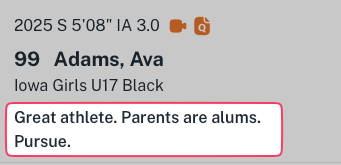](https://docs.universityathlete.com/uploads/images/gallery/2024-01/JdNimage.png) A *Summary* (formerly Group) is a brief description of the athlete that is shared amongst staff. Your program may only have one *Summary* per athlete. --- ##### [Overall Rating](https://docs.universityathlete.com/books/online-usage/page/ratings "Ratings") [](https://docs.universityathlete.com/uploads/images/gallery/2024-01/Yvzimage.png) A grade from A+ to F that summarizes an athlete's overall ability. --- ##### [Recruitability Score](https://docs.universityathlete.com/books/online-usage/page/ratings "Ratings") [](https://docs.universityathlete.com/uploads/images/gallery/2024-01/AnVimage.png) A number from +2 through -1 that compares the athlete to your current roster. Averages of this score over hundreds of college evaluations will also be used to help us anonymously suggest best fit for athletes. --- ##### [Boards](https://docs.universityathlete.com/books/online-usage/chapter/boards "Boards") ***Tier 1 Only.*** Drag and drop visual boards with filtered columns and dividers to organize your recruits --- ##### [Tasks](https://docs.universityathlete.com/books/online-usage/chapter/tasks "Tasks") ***Tier 1 Only.*** Assignable tasks to staff from templates. --- ##### Email ***Tier 1 Only.*** Customizable templates for frequently used email content with variables to specify athlete name, grad year, position, club name ... etc. The message body will be copied to your clipboard and a new email from your default program launched addressed to the athlete if their email is known. Simply paste the message and send. This will keep all your outgoing messages saved in your sent mail. A coded BCC email will also be used to save the sent email as a note.