# Athlete Search

### <span style="color: rgb(0, 0, 0);"><span style="background-color: transparent; font-family: Arial, sans-serif; font-size: 11pt; font-style: normal; font-variant-ligatures: normal; font-variant-caps: normal; font-weight: bold; white-space-collapse: preserve;">Flyout with Filters</span></span>

<span style="font-size: 11pt; font-family: Arial,sans-serif; color: #000000; background-color: transparent; font-weight: 400; font-style: normal; font-variant: normal; text-decoration: none; vertical-align: baseline; white-space: pre-wrap;">Generally there are 4 different groups of search filters: Athlete (General Athlete data), Evaluations, Ratings, and Events. Each of them can be turned ON by the corresponding toggle, and opened or closed by the arrow UP or DOWN.</span>

<span style="font-size: 11pt; font-family: Arial,sans-serif; color: #000000; background-color: transparent; font-weight: 400; font-style: normal; font-variant: normal; text-decoration: none; vertical-align: baseline; white-space: pre-wrap;">One or several toggles can be active at the same time.</span>

<span style="font-size: 11pt; font-family: Arial,sans-serif; color: #000000; background-color: transparent; font-weight: 400; font-style: normal; font-variant: normal; text-decoration: none; vertical-align: baseline; white-space: pre-wrap;">First when you click Search Athlete you will see the list of athletes evaluated by your College.</span>

<span style="font-size: 11pt; font-family: Arial,sans-serif; color: #000000; background-color: transparent; font-weight: 400; font-style: normal; font-variant: normal; text-decoration: none; vertical-align: baseline; white-space: pre-wrap;">The flyout with search filters pops up automatically, with the Evaluated toggle ON by default.</span>

<span style="font-size: 11pt; font-family: Arial,sans-serif; color: #000000; background-color: transparent; font-weight: 400; font-style: normal; font-variant: normal; text-decoration: none; vertical-align: baseline; white-space: pre-wrap;">To apply the Search filters you have to click the Apply button.</span>

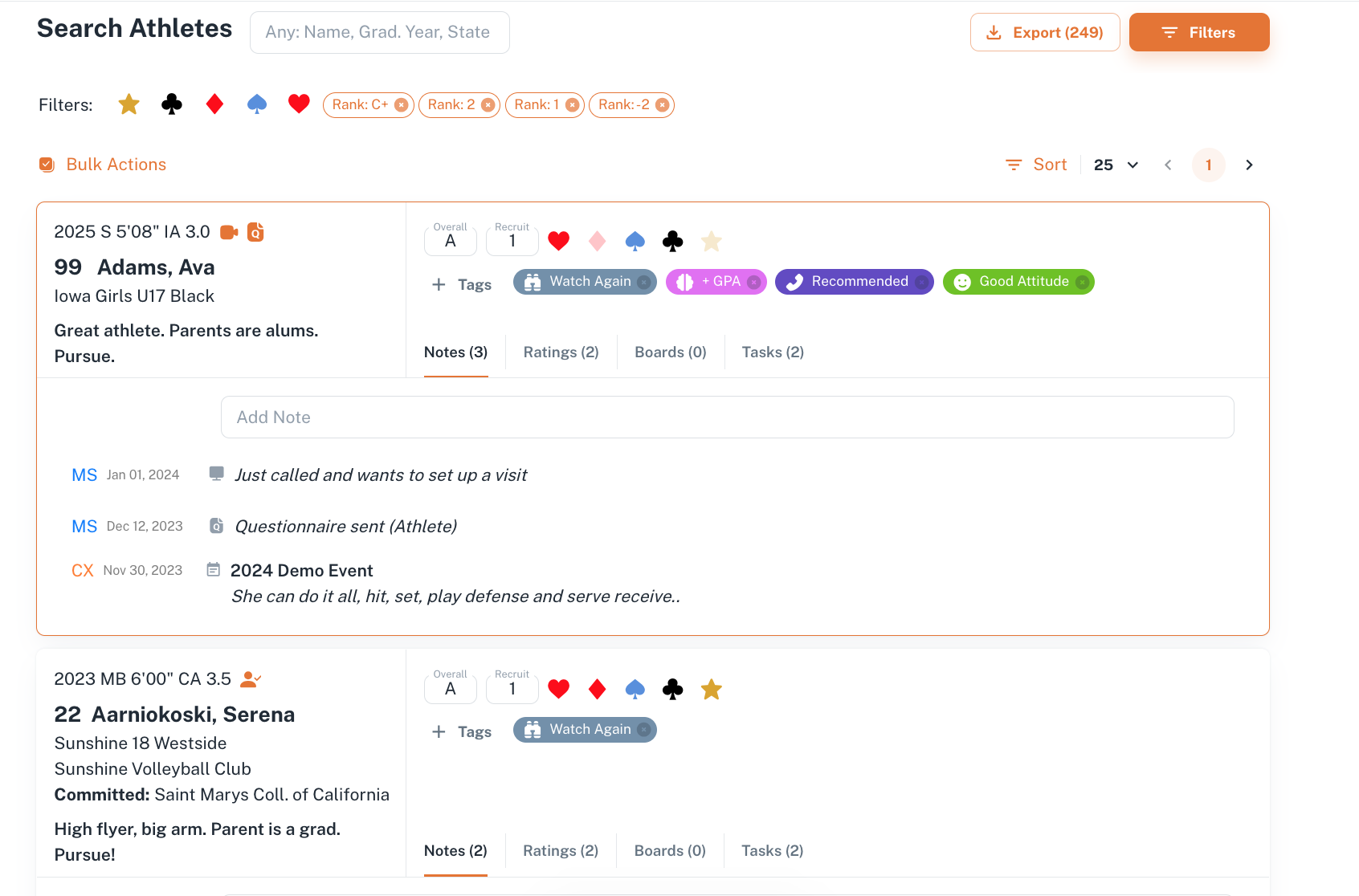
<span style="font-size: 11pt; font-family: Arial,sans-serif; color: #000000; background-color: transparent; font-weight: 400; font-style: normal; font-variant: normal; text-decoration: none; vertical-align: baseline; white-space: pre-wrap;">If you pick up a search filter, and close the list of filters by arrow UP, the filters will pop up as pills right to the toggle. It works the same way if the toggle is OFF, but the pills are greyished, inactive. </span>

<span style="font-size: 11pt; font-family: Arial,sans-serif; color: #000000; background-color: transparent; font-weight: 400; font-style: normal; font-variant: normal; text-decoration: none; vertical-align: baseline; white-space: pre-wrap;">The active pills are also displayed at the Search page, where search results are displayed.</span>

<span style="font-size: 11pt; font-family: Arial,sans-serif; color: #000000; background-color: transparent; font-weight: 400; font-style: normal; font-variant: normal; text-decoration: none; vertical-align: baseline; white-space: pre-wrap;"><span style="border: none; display: inline-block; overflow: hidden; width: 354px; height: 36px;">![](https://lh7-us.googleusercontent.com/A7VPhXniHPt6PSYW8Rz7hY6PPrsLVpCEO7fEeKRT56mY8qlDZPMH7A7G1MYggq6QuaL1ctqNgC2ShfNf_Q44cP8mbnD6i6vqOWHa8PVkCqCfH2uJrZwVsTZlkhtkrRlsAMN99Uymt-Wp6_-YFfw5ytc)</span></span>

<span style="font-size: 11pt; font-family: Arial,sans-serif; color: #000000; background-color: transparent; font-weight: 400; font-style: normal; font-variant: normal; text-decoration: none; vertical-align: baseline; white-space: pre-wrap;"><span style="border: none; display: inline-block; overflow: hidden; width: 283px; height: 39px;">![](https://lh7-us.googleusercontent.com/lx1FmAMm8xEY0kLECUwzFHIs_0VlFgbkS22g5caWgztgl-tmn_JGEawGvqxpV5_k4IOcqyg4w6A-EjomQkTBuHzrj0MqDod7VWwugS8G2Xk2sSu4fKnHCOotG38JzGhFt_5qxl-V_pEtFYL5fvuTeiw)</span></span>

<span style="color: rgb(0, 0, 0);">  
</span>

<span style="font-size: 11pt; font-family: Arial,sans-serif; color: #000000; background-color: transparent; font-weight: 400; font-style: normal; font-variant: normal; text-decoration: none; vertical-align: baseline; white-space: pre-wrap;">When you click the Apply button, you will see the Athletes filtered according to the criteria. In addition you can see the whole number of athletes found by these criteria at the top right corner of the flyout with filters. </span>

<span id="bkmrk--1" style="font-weight: normal; color: rgb(0, 0, 0);"><span style="font-size: 11pt; font-family: Arial, sans-serif; background-color: transparent; font-weight: 400; font-style: normal; font-variant: normal; white-space-collapse: preserve;"><span style="border-width: initial; border-style: none; display: inline-block; overflow: hidden; width: 624px; height: 383px;">![](https://lh7-us.googleusercontent.com/ZBPLxY3XrlD56rMVGiCyokL8UQx253NFdQV56A_syzCyd2N1LCH4Z6nSvwHDxNmYh_YdqwpCtEZgYP75HxpLftVpkDvBnsFTtSscaOwTrTOWIvX9k6K_AAcGNYalnuQlNrlF_6sCke5jvS4939iNDRM)</span></span></span>

<span style="font-size: 11pt; font-family: Arial,sans-serif; color: #000000; background-color: transparent; font-weight: 400; font-style: normal; font-variant: normal; text-decoration: none; vertical-align: baseline; white-space: pre-wrap;">You can close the flyout by clicking the cross at its top left corner, or open it again, clicking the Filters button at the Search Athlete page.</span>

<span style="color: rgb(0, 0, 0);">  
</span>

<span style="font-size: 11pt; font-family: Arial,sans-serif; color: #000000; background-color: transparent; font-weight: bold; font-style: normal; font-variant: normal; text-decoration: none; vertical-align: baseline; white-space: pre-wrap;"><span style="border: none; display: inline-block; overflow: hidden; width: 480px; height: 38px;">![](https://lh7-us.googleusercontent.com/ZVZygmqfDL-ZLz-YY3Bc_fx6XCTIWkPQE5CTBUP8A-GmvQNLfJP7SrMUBK51iY8-BdIx4st8149xDtWzyApkrLD53rjwQt7_aplgqRwC1YtwLkItQgR3lznOuO2gFlHGsQ0QlTALyNKKfWxidv4ScFI)</span></span>

<span style="color: rgb(0, 0, 0);">  
</span>

#### <span style="font-size: 11pt; font-family: Arial,sans-serif; color: #000000; background-color: transparent; font-weight: bold; font-style: normal; font-variant: normal; text-decoration: none; vertical-align: baseline; white-space: pre-wrap;">Search by Athlete </span>

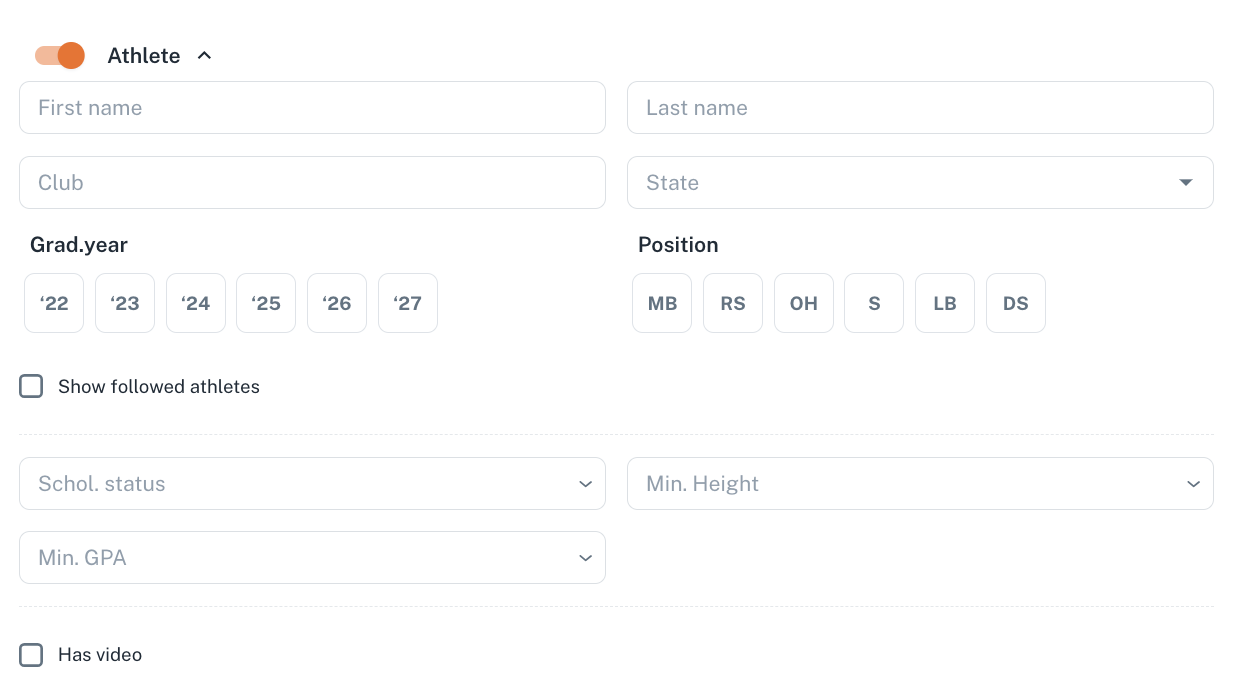
<span style="color: rgb(0, 0, 0);"><span style="font-size: 11pt; font-family: Arial, sans-serif; background-color: transparent; font-weight: 400; font-style: normal; font-variant: normal; text-decoration: none; vertical-align: baseline; white-space: pre-wrap;">Available here is the Search by Athlete First, Last name, Grad Year, State, Club, Position, Scholarship status, Minimum Height and Minimum GRA. You can filter out athletes you follow, or who have video as well.</span><span style="font-size: 11pt; font-family: Arial, sans-serif; background-color: transparent; font-weight: 400; font-style: normal; font-variant: normal; text-decoration: none; vertical-align: baseline; white-space: pre-wrap;"><span style="border: none; display: inline-block; overflow: hidden; width: 624px; height: 349px;">![](https://lh7-us.googleusercontent.com/hZEmz4k_4zXT-97oe72L41PyO2jeZ2FINEWQjKUbbnfIkVqWwnKiGBTJlenkETTfSDTkY1N5mXSUL3Q5laVMGncgxYjGvWh48juGmHIF6z2gIwr_YH3nljqjUGrHy565DHT6uia23KzVzKf_0D4sLZY)</span></span></span>
#### <span style="font-size: 11pt; font-family: Arial,sans-serif; color: #000000; background-color: transparent; font-weight: bold; font-style: normal; font-variant: normal; text-decoration: none; vertical-align: baseline; white-space: pre-wrap;">Search by Evaluated Athletes</span>

<span style="font-size: 11pt; font-family: Arial,sans-serif; color: #000000; background-color: transparent; font-weight: 400; font-style: normal; font-variant: normal; text-decoration: none; vertical-align: baseline; white-space: pre-wrap;">Here you can select Primary Tags by clicking them ON, or add to the Search Secondary Tags by clicking + Tag button and selecting the Tag you need. </span>

<span style="font-size: 11pt; font-family: Arial,sans-serif; color: #000000; background-color: transparent; font-weight: 400; font-style: normal; font-variant: normal; text-decoration: none; vertical-align: baseline; white-space: pre-wrap;"><span style="border: none; display: inline-block; overflow: hidden; width: 486px; height: 127px;">![](https://lh7-us.googleusercontent.com/MahX1yCkKTC2Pm78s2gfJRa4B31uAj9_A_dXz0GNtx6VibNXX3mPTs5QWFC5ULr-gPJ8zv8gHrkd-R-fs-qnvY7yJ84yesRsDJmxjHNKQG-Z0YzufSyopaLyDt465sLiFRBl7JdUD-5SJPacGNDbocE)</span></span>

<span style="color: rgb(0, 0, 0);">  
</span>

<span style="font-size: 11pt; font-family: Arial,sans-serif; color: #000000; background-color: transparent; font-weight: 400; font-style: normal; font-variant: normal; text-decoration: none; vertical-align: baseline; white-space: pre-wrap;">To remove a Secondary Tag from search, click the cross at the pill. </span>

<span style="font-size: 11pt; font-family: Arial,sans-serif; color: #000000; background-color: transparent; font-weight: 400; font-style: normal; font-variant: normal; text-decoration: none; vertical-align: baseline; white-space: pre-wrap;"><span style="border: none; display: inline-block; overflow: hidden; width: 342px; height: 76px;">![](https://lh7-us.googleusercontent.com/5q1dOHjS29T7kw5isU4GmirgXdWRbhTPecSEkSiO8zJUV6cq0pnmYXY94BV2PK6UvitcmNy3CyPVd7MnUkCr24wI1joc5eRH3zNGBJKROzmJMioMjYPoj2Th1hd0rcS_PxGQp8wAQdrMN5hU9W6f4yM)</span></span>

<span style="font-size: 11pt; font-family: Arial,sans-serif; color: #000000; background-color: transparent; font-weight: 400; font-style: normal; font-variant: normal; text-decoration: none; vertical-align: baseline; white-space: pre-wrap;">You can apply the logic of all, then you will see the Athletes having all of the tags you specified, or the logic of ANY, in this case athletes with at least 1 tag you mentioned will pop up at search results. </span>

<span style="color: rgb(0, 0, 0);"><span style="font-size: 11pt; font-family: Arial, sans-serif; background-color: transparent; font-weight: 400; font-style: normal; font-variant: normal; text-decoration: none; vertical-align: baseline; white-space: pre-wrap;"> </span><span style="font-size: 11pt; font-family: Arial, sans-serif; background-color: transparent; font-weight: 400; font-style: normal; font-variant: normal; text-decoration: none; vertical-align: baseline; white-space: pre-wrap;"><span style="border: none; display: inline-block; overflow: hidden; width: 191px; height: 83px;">![](https://lh7-us.googleusercontent.com/xLp-kkn4OAE2qQiXqtsuBgtP3YY7VUCtDg6HYlmmgc0Ad3o3A70t8wVf920eW78dC5KVTmrA90AuhZVPxednWIBaNbiKcUVE4JK0qlcGDQBuwWYgKeoYjn0zabZe6rZjW7auHKGUYaE9I26-XqPvw5U)</span></span></span>

<span style="color: rgb(0, 0, 0);">  
</span>

<span style="font-size: 11pt; font-family: Arial,sans-serif; color: #000000; background-color: transparent; font-weight: 400; font-style: normal; font-variant: normal; text-decoration: none; vertical-align: baseline; white-space: pre-wrap;">In addition, it is available to search athletes by texts in Summary, or in Notes, and by Coach, who placed the evaluation.</span>

<span style="color: rgb(0, 0, 0);">  
</span>

<span style="font-size: 11pt; font-family: Arial,sans-serif; color: #000000; background-color: transparent; font-weight: 400; font-style: normal; font-variant: normal; text-decoration: none; vertical-align: baseline; white-space: pre-wrap;"><span style="border: none; display: inline-block; overflow: hidden; width: 624px; height: 113px;">![](https://lh7-us.googleusercontent.com/bThRisJnYzvGMrKxf2W9WWC1sIoXknoq_UYtgGKMfvgjqIXI4vsSb-W1Wg5dZH2zzXUkUukGIsgG8pA8muG9F2GdseV0berxu5CjRYqSvBG3evoy23nE2MAbL9zON1m2ZwlbPyef1BivlggRc4Qylu8)</span></span>

<span style="color: rgb(0, 0, 0);">  
</span>

#### <span style="font-size: 11pt; font-family: Arial,sans-serif; color: #000000; background-color: transparent; font-weight: bold; font-style: normal; font-variant: normal; text-decoration: none; vertical-align: baseline; white-space: pre-wrap;">Search by Ratings</span>

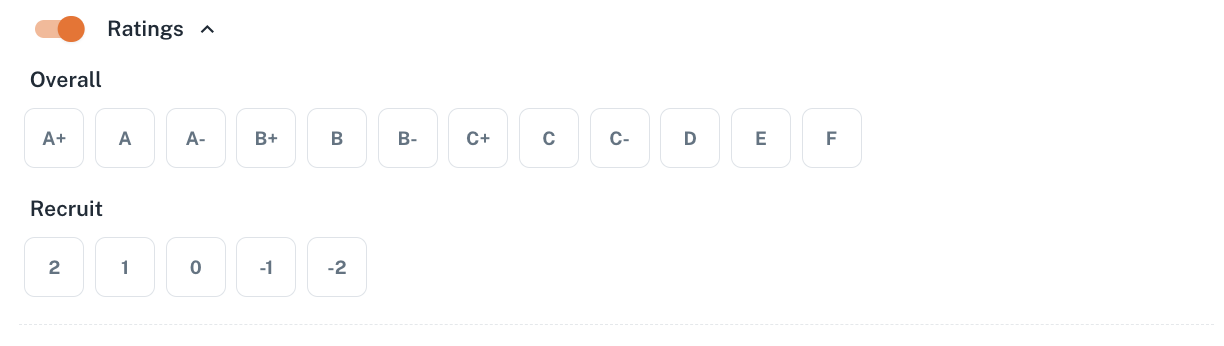
<span style="font-size: 11pt; font-family: Arial,sans-serif; color: #000000; background-color: transparent; font-weight: 400; font-style: normal; font-variant: normal; text-decoration: none; vertical-align: baseline; white-space: pre-wrap;">These filters allow search Athletes, ranked with the Overall or Recruit by your College.</span>

<span style="font-size: 11pt; font-family: Arial,sans-serif; color: #000000; background-color: transparent; font-weight: 400; font-style: normal; font-variant: normal; text-decoration: none; vertical-align: baseline; white-space: pre-wrap;">Just pick up the score to filter out the athletes.</span>

<span style="font-size: 11pt; font-family: Arial,sans-serif; color: #000000; background-color: transparent; font-weight: 400; font-style: normal; font-variant: normal; text-decoration: none; vertical-align: baseline; white-space: pre-wrap;">The Search logic is any: if you pick up the Overall rating score A+, B+, and Recruit 2, 1, and click the Apply button, you will see the athletes who have at least one of the scores: either A+, or B+ or 2 or 1.</span>

<span style="color: rgb(0, 0, 0);">  
</span>

<span style="font-size: 11pt; font-family: Arial,sans-serif; color: #000000; background-color: transparent; font-weight: 400; font-style: normal; font-variant: normal; text-decoration: none; vertical-align: baseline; white-space: pre-wrap;"><span style="border: none; display: inline-block; overflow: hidden; width: 624px; height: 176px;">![](https://lh7-us.googleusercontent.com/0JECwlPfsO6QblKgRqQRB1ZKi33bXciR7d_YN6fxQuln2slYU_K99mRrbVsBjLc593FfU_tTtMaZao0J_31cT4S8r-roAwLazuJZ84408CsGD1efqwQAtRyRHABSfzUrKn5-B9XG0P11FFq_lijXSis)</span></span>

<span style="font-size: 11pt; font-family: Arial,sans-serif; color: #000000; background-color: transparent; font-weight: bold; font-style: normal; font-variant: normal; text-decoration: none; vertical-align: baseline; white-space: pre-wrap;">Search by Events</span>

<span style="font-size: 11pt; font-family: Arial,sans-serif; color: #000000; background-color: transparent; font-weight: 400; font-style: normal; font-variant: normal; text-decoration: none; vertical-align: baseline; white-space: pre-wrap;">Here you can search Athletes who participated at the events, filtering by event year and selecting the particular event name.</span>

<span style="font-size: 11pt; font-family: Arial,sans-serif; color: #000000; background-color: transparent; font-weight: 400; font-style: normal; font-variant: normal; text-decoration: none; vertical-align: baseline; white-space: pre-wrap;">In addition the checkbox allows to filter out the athletes who were evaluated exactly at these events. </span>

<span style="color: rgb(0, 0, 0);">  
</span>

<span style="font-size: 11pt; font-family: Arial,sans-serif; color: #000000; background-color: transparent; font-weight: 400; font-style: normal; font-variant: normal; text-decoration: none; vertical-align: baseline; white-space: pre-wrap;"><span style="border: none; display: inline-block; overflow: hidden; width: 624px; height: 84px;">![](https://lh7-us.googleusercontent.com/dPE2J9Zpm0312KpryWrRAWB1g90SDOmfAwi7YVF7EqcATvVoIsZ5Vtklf1EXP21aDqsCZ-fnO6dVOPcNYwAprWymNAaJAZKNjWB_Nsr-LIEK0MaCCZ9Cv5s19R0u7K60rzoZaLUhiPVV46fiT_H7JYw)</span></span>

#### <span style="color: rgb(0, 0, 0);">Search Athlete Page</span>

<span style="color: rgb(0, 0, 0);">This is a page showing the search results, Athlete Cards of Athletes, corresponding to the search criteria. </span>

<span style="color: rgb(0, 0, 0);">Here you can sort Athletes by First, Last Name, Position, State, and select the number of Athletes to display at each page (25 or 50).</span>

<span style="color: rgb(0, 0, 0);">Export button serves for exporting the Athletes. You can only export up to 300 athletes, and only evaluated (having a Tag, Note, Summary, or Rating).</span>

<span style="color: rgb(0, 0, 0);">The Export button becomes active, when the number of athletes available for exporting is below 300.</span>

<span style="color: rgb(0, 0, 0);">[![Screenshot 2024-01-07 at 21.39.16.png](https://docs.universityathlete.com/uploads/images/gallery/2024-01/scaled-1680-/screenshot-2024-01-07-at-21-39-16.png)](https://docs.universityathlete.com/uploads/images/gallery/2024-01/screenshot-2024-01-07-at-21-39-16.png)</span>